Halo, saya Hello, I am

Adi Rizky Pratama

Saya seorang I am a

Dosen Teknik Informatika di UBP Karawang sekaligus Programmer Freelance. Menggabungkan riset akademis di bidang AI & Machine Learning dengan pengembangan solusi teknologi nyata untuk industri. Lecturer of Informatics Engineering at UBP Karawang and a Freelance Programmer. Combining academic research in AI & Machine Learning with the development of real-world technology solutions for industry.

6+
Publikasi Publications
50+
Sitasi Citations
10+
Proyek Projects
Dosen & Peneliti Lecturer & Researcher
Full-Stack Dev Full-Stack Dev
AI / ML AI / ML
Geser untuk efek 3D Drag for 3D effect
Adi Rizky Pratama

Akademisi yang Melek Industri Industry-Savvy Academician

Sebagai dosen di Program Studi Teknik Informatika Universitas Buana Perjuangan Karawang, saya mengajar dan meneliti di bidang kecerdasan buatan, pengolahan citra, dan pengembangan aplikasi. Di sisi lain, pengalaman sebagai programmer freelance memungkinkan saya menjembatani teori dan praktik — menghadirkan solusi teknologi yang didasari riset ilmiah yang kuat. As a lecturer in the Informatics Engineering Study Program at Universitas Buana Perjuangan Karawang, I teach and conduct research in artificial intelligence, image processing, and application development. On the other hand, my experience as a freelance programmer allows me to bridge theory and practice — delivering technology solutions built on robust scientific research.

Menjabat sebagai Kepala Pusat Data dan Informasi (PUSDATIN) UBP Karawang, saya terbiasa memimpin proyek digitalisasi skala besar dan berkolaborasi lintas tim. Serving as the Head of the Center for Data and Information (PUSDATIN) at UBP Karawang, I am accustomed to leading large-scale digitalization projects and collaborating across teams.

Dosen Tetap Full-time Lecturer

Teknik Informatika, UBP Karawang Informatics Engineering, UBP Karawang

Riset AI & ML AI & ML Research

CNN, LSTM, k-NN, OCR

Kepala PUSDATIN Head of PUSDATIN

Digitalisasi & Data Center Digitalization & Data Center

Freelance Dev Freelance Dev

Web & Mobile Applications Web & Mobile Applications

Apa yang Bisa Saya Bantu? How Can I Help You?

Menggabungkan keahlian akademis dan pengalaman industri untuk memberikan solusi terbaik. Combining academic expertise and industry experience to deliver the best solutions.

Software Development

Pengembangan aplikasi web & mobile custom sesuai kebutuhan bisnis Anda. Dari landing page hingga sistem enterprise. Custom web & mobile application development tailored to your business needs. From landing pages to enterprise systems.

IT Consulting

Konsultasi arsitektur sistem, pemilihan teknologi, transformasi digital, dan optimasi infrastruktur IT. Consulting on system architecture, technology stack selection, digital transformation, and IT infrastructure optimization.

Corporate Training

Pelatihan pemrograman, data science, dan AI untuk tim korporat maupun institusi pendidikan. Programming, data science, and AI training for corporate teams and educational institutions.

Research Collaboration

Kolaborasi riset di bidang machine learning, computer vision, dan data mining untuk publikasi ilmiah. Research collaboration in machine learning, computer vision, and data mining for scientific publications.

Tech Stack yang Dikuasai Mastered Tech Stack

HTML5
CSS3
JavaScript
Bootstrap
PHP
Laravel
Node.js
Python
TensorFlow
Keras
MySQL
PostgreSQL
Git & GitHub

Tri Dharma Perguruan Tinggi Three Pillars of Higher Education

Pengajaran, penelitian, dan pengabdian masyarakat sebagai fondasi kontribusi ilmiah. Teaching, research, and community service as the foundation of scientific contribution.

Mata Kuliah yang Diampu Courses Taught

Pemrograman Web Web Programming
Kecerdasan Buatan Artificial Intelligence
Machine Learning Machine Learning
Pengolahan Citra Digital Digital Image Processing
Basis Data Database Systems
Pemrograman Mobile Mobile Programming

Pengabdian Masyarakat Community Service

Digitalisasi UMKM melalui implementasi e-learning, QRIS, dan sistem informasi untuk pelaku usaha mikro di Karawang. Digitalization of MSMEs through the implementation of e-learning, QRIS, and information systems for micro-businesses in Karawang.

Highlight Publikasi Riset Research Publication Highlights

1

Penggunaan media pembelajaran Wordwall untuk meningkatkan minat dan motivasi belajar siswa The use of Wordwall learning media to improve students' interest and learning motivation

Zahro, N. A. Q., & Pratama, A. R.

50+ Sitasi 50+ Citations Jurnal Journal
2

Perbandingan Algoritma Apriori Dan FP-Growth Terhadap Market Basket Analysis Comparison of Apriori and FP-Growth Algorithms for Market Basket Analysis

Fathurrahman, M., Pratama, A. R., & Al-Mudzakir, T.

Data Mining Jurnal Journal
3

Implementasi CNN Untuk Klasifikasi Citra Kemasan Kardus Defect dan No Defect CNN Implementation for Defect and No Defect Cardboard Box Image Classification

Antoni, A., Rohana, T., & Pratama, A. R.

Computer Vision CNN

Proyek & Hasil Karya Projects & Creative Works

Koleksi proyek dari dunia akademik, freelance, dan open source. A collection of projects from academic, freelance, and open-source fields.

Memuat proyek... Loading projects...

Pengalaman & Pendidikan Experience & Education

Perjalanan karir di dunia akademik dan industri teknologi. Career journey in the academic world and technology industry.

Akademik Academic 2018 — Sekarang 2018 — Present

Dosen Tetap Full-time Lecturer

Universitas Buana Perjuangan Karawang

Mengajar mata kuliah Pemrograman Web, AI, Machine Learning, dan membimbing riset mahasiswa di Program Studi Teknik Informatika. Teaching Web Programming, AI, Machine Learning, and supervising student research in the Informatics Engineering Study Program.

Freelance Freelance 2019 — Sekarang 2019 — Present

Freelance Web Programmer Freelance Web Programmer

Berbagai Klien & Proyek Various Clients & Projects

Mengembangkan aplikasi web dan mobile untuk klien dari berbagai industri. Spesialisasi di PHP/Laravel, JavaScript, dan Python. Developing web and mobile applications for clients across various industries. Specializing in PHP/Laravel, JavaScript, and Python.

Akademik Academic 2018 — Sekarang 2018 — Present

Kepala PUSDATIN Head of PUSDATIN

UBP Karawang

Memimpin Pusat Data dan Informasi universitas. Mengelola infrastruktur IT, sistem informasi akademik, dan digitalisasi kampus. Leading the university's Center for Data and Information. Managing IT infrastructure, academic information systems, and campus digitalization.

Pengabdian Service 2021 — Sekarang 2021 — Present

Digitalisasi UMKM MSME Digitalization

Karawang & Sekitarnya Karawang & Surrounding Areas

Program pengabdian masyarakat: pelatihan IT, implementasi e-learning dan QRIS untuk pelaku usaha mikro. Community service program: IT training, e-learning implementation, and QRIS integration for micro-businesses.

Pendidikan Education 2015 — 2017

S2 — Magister Teknik Informatika Master of Informatics Engineering

Universitas / Institusi University / Institution

Fokus studi pada kecerdasan buatan, pengolahan citra, dan machine learning. Study focus on artificial intelligence, image processing, and machine learning.

Pendidikan Education 2011 — 2015

S1 — Sarjana Teknik Informatika Bachelor of Informatics Engineering

Universitas / Institusi University / Institution

Fondasi keilmuan di bidang pemrograman, basis data, jaringan komputer, dan rekayasa perangkat lunak. Foundational knowledge in programming, databases, computer networks, and software engineering.

Hubungi Saya Contact Me

Ada proyek, kolaborasi riset, atau pertanyaan? Jangan ragu untuk menghubungi. Have a project, research collaboration, or question? Feel free to reach out.

Mari Berkolaborasi! Let's Collaborate!

Saya selalu terbuka untuk peluang kolaborasi, baik di bidang akademik maupun pengembangan software. Silakan hubungi saya melalui platform berikut. I am always open to collaboration opportunities, both in the academic sphere and software development. Please contact me through the platforms below.
Advertisement
Responsive Ad Unit (Top Banner)

Rabu, 08 Juli 2026

Termius: Modern SSH Client for Beginner Sysadmins

Termius: Modern SSH Client for Beginner Sysadmins

Termius: Modern SSH Client for Beginner Sysadmins

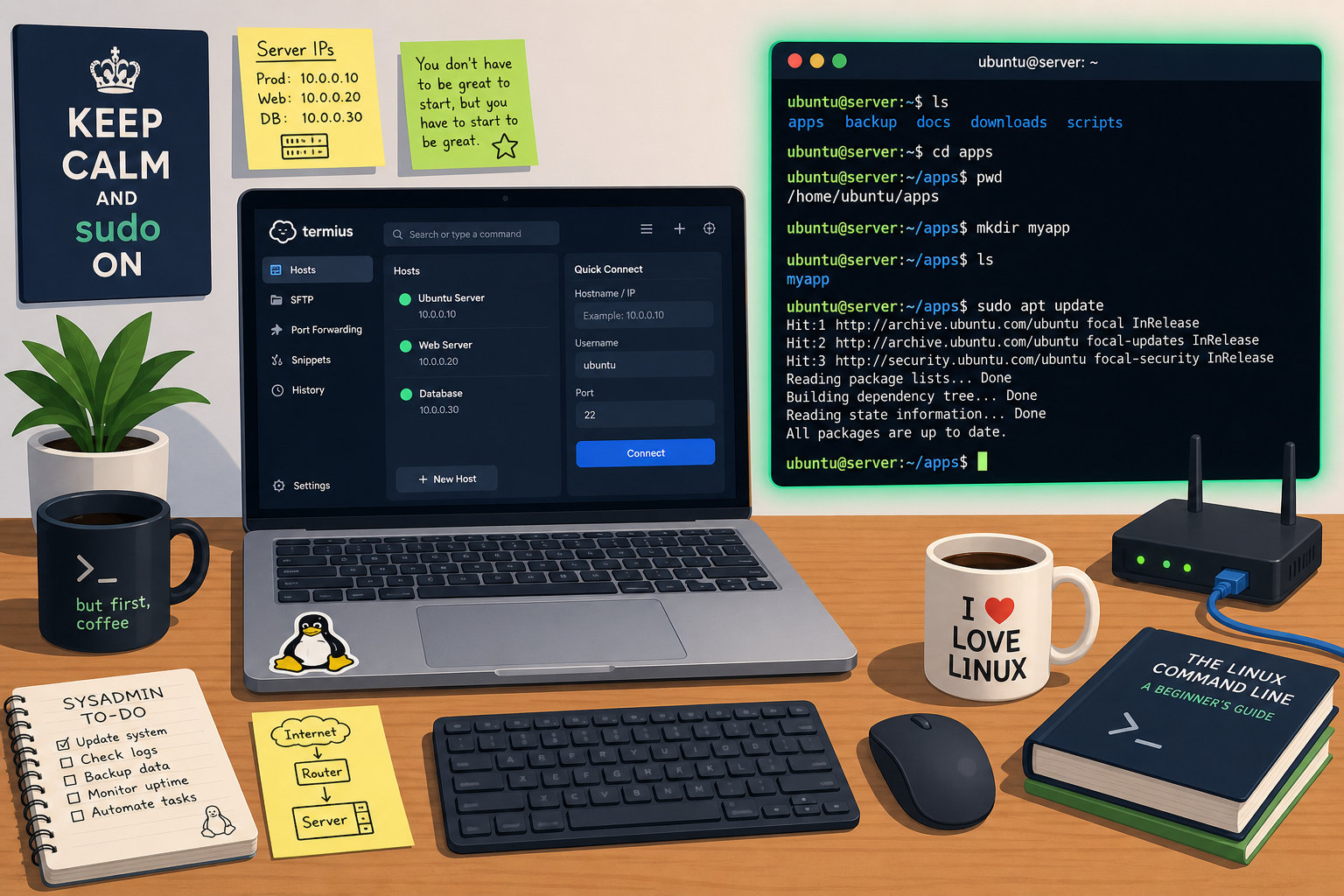
Termius isn't just an ordinary terminal. It comes with a clean interface, cross-device sync, and security features that make it easy for novice sysadmins to manage servers without hassle. This article will guide you through getting to know Termius, installing it, mastering basic Linux commands, and keeping connections secure.

Getting to Know Termius: A Modern SSH Client for Beginners

Termius is an SSH and Telnet client designed to be easy to use, both on desktop and mobile. Built for IT professionals yet friendly for those just starting out, Termius eliminates the complexity of manual configuration.

Termius's Superior Features for Sysadmins

  • Cross-Platform Sync: Save hosts, credentials, and command snippets, then access them from Windows, macOS, Linux, iOS, or Android. Everything is connected through your Termius account.
  • Centralized Host Management: Organize servers into groups, label them, and import from your ~/.ssh/config all at once.
  • Multi-Factor Authentication: Supports SSH keys, a password vault, and biometric authentication on mobile devices.
  • Snippets & Autocomplete: Save frequently used commands; Termius will suggest them as you type in the terminal.
  • Port Forwarding & Visual SFTP: Create SSH tunnels without remembering long syntax, plus transfer files via a simple GUI.

Comparison of Termius with Other SSH Clients

Client Pros Cons
Termius Modern UI, cloud sync, snippets, multi-platform Some advanced features require a premium subscription
PuTTY Lightweight, free, legendary Outdated interface, no sync, Windows only
OpenSSH Native on Linux/macOS, highly configurable No GUI, requires learning additional CLI
MobaXterm Feature-rich (X server, plugins), free version limited Windows only, interface can confuse beginners

Termius is the right choice when mobility and ease of use are more important than advanced customization.

Installing and Initial Configuration of Termius

Installation Steps for Termius on Various Platforms

  • Windows / macOS / Linux: Download from termius.com or the app stores (Mac App Store, Microsoft Store). For Linux, .deb/.rpm packages or AppImage are available.
  • iOS / Android: Install via the App Store or Google Play Store.

After installation, create a free Termius account to enable sync. The free version already includes host management, SSH keys, and basic snippets.

Saving Credentials and Managing Hosts in Termius

  1. Click New Host, enter the IP/domain address, port (default 22), and an alias.
  2. In the Authentication section, select a method:
    • Password: Save directly (encrypted in the vault).
    • Key: Import an SSH private key or generate a new key pair.
  3. Use Groups to categorize servers, for example "Production" and "Staging".
  4. Leverage Snippets to store commands like sudo apt update && sudo apt upgrade -y. Once connected, type a few letters and the snippet will appear.

After the host is saved, double-click for an instant connection—the terminal is ready to receive commands.

Essential Linux Commands Every Beginner Sysadmin Must Master

Once you log into a server via Termius, you will be faced with a shell. Master these commands so you won't get lost.

Navigation and File Management (ls, cd, mkdir, cp, mv, rm)

ls -lah        # List directory contents in detail with size and permissions
cd /var/log    # Enter the log directory
mkdir project  # Create a new directory named 'project'
cp file.txt backup.txt    # Copy a file
mv report.md ~/Documents  # Move or rename a file
rm -rf temp_dir/          # Delete a directory and its contents (be careful!)

Use man <command> to read the manual at any time.

System and Network Monitoring (top, df, ping, netstat)

top           # View real-time processes with CPU/RAM usage
df -h         # Check disk usage in a human-readable format
ping google.com  # Test connectivity to a host
netstat -tulpn   # Display listening ports (use 'ss -tulpn' for modern Linux)

top can be replaced with htop if available, which is more interactive. These commands help you quickly diagnose server issues.

Security Tips and Best Practices for Beginner Sysadmins

Security is the foundation, not an afterthought. Start with good habits from day one.

Using SSH Key Authentication

Passwords are easy to crack or steal. SSH keys are a public-private key pair that is much more secure.

  1. In Termius, go to Keychain > New Key > select the type (Ed25519 recommended) then generate.
  2. Copy the public key and paste it into the ~/.ssh/authorized_keys file on the server.
  3. Disable password login on the SSH server (optional, after the key works) by editing /etc/ssh/sshd_config:
    PasswordAuthentication no
  4. Keep the private key safe; use a passphrase if necessary.

Termius stores keys in an encrypted vault, so you don't have to remember all passphrases.

Securing Connections with Termius and Safe Habits

  • Take Advantage of Encrypted Sync: Host data and credentials are end-to-end encrypted. Make sure your Termius account is protected by a strong password or 2FA.
  • Always Use Encrypted Sessions: Termius automatically encrypts SSH traffic. Avoid Telnet unless absolutely necessary.
  • Use Sudo, Not Root: Never log in directly as root. Create a regular user, then sudo for administrative tasks.
  • Update Regularly: Run sudo apt update && sudo apt upgrade (Debian/Ubuntu) or sudo dnf upgrade (Fedora) periodically.
  • Logout When Finished: Type exit or use the Ctrl+D shortcut to close the session, especially on public devices.

Termius can also be locked with a PIN or biometrics on your phone, preventing unauthorized access if the device is lost.

Termius bridges convenience and security in one application. By mastering basic commands and safe habits, your journey as a sysadmin will be smoother. Start now—connect to your server and practice directly.

This article was written by artificial intelligence (AI) using the deepseek-v4-pro model via SumoPod AI.

This article was translated by Artificial Intelligence (AI) using deepseek-v4-pro via SumoPod AI.

Tidak ada komentar:

Posting Komentar

Dosen Teknik Informatika di UBP Karawang sekaligus Programmer Freelance. Menggabungkan riset akademis di bidang AI & Machine Learning dengan pengembangan solusi teknologi nyata untuk industri.

Cari Blog Ini

Diberdayakan oleh Blogger.

Arsip Blog