Halo, saya Hello, I am

Adi Rizky Pratama

Saya seorang I am a

Dosen Teknik Informatika di UBP Karawang sekaligus Programmer Freelance. Menggabungkan riset akademis di bidang AI & Machine Learning dengan pengembangan solusi teknologi nyata untuk industri. Lecturer of Informatics Engineering at UBP Karawang and a Freelance Programmer. Combining academic research in AI & Machine Learning with the development of real-world technology solutions for industry.

6+
Publikasi Publications
50+
Sitasi Citations
10+
Proyek Projects
Dosen & Peneliti Lecturer & Researcher
Full-Stack Dev Full-Stack Dev
AI / ML AI / ML
Geser untuk efek 3D Drag for 3D effect
Adi Rizky Pratama

Akademisi yang Melek Industri Industry-Savvy Academician

Sebagai dosen di Program Studi Teknik Informatika Universitas Buana Perjuangan Karawang, saya mengajar dan meneliti di bidang kecerdasan buatan, pengolahan citra, dan pengembangan aplikasi. Di sisi lain, pengalaman sebagai programmer freelance memungkinkan saya menjembatani teori dan praktik — menghadirkan solusi teknologi yang didasari riset ilmiah yang kuat. As a lecturer in the Informatics Engineering Study Program at Universitas Buana Perjuangan Karawang, I teach and conduct research in artificial intelligence, image processing, and application development. On the other hand, my experience as a freelance programmer allows me to bridge theory and practice — delivering technology solutions built on robust scientific research.

Menjabat sebagai Kepala Pusat Data dan Informasi (PUSDATIN) UBP Karawang, saya terbiasa memimpin proyek digitalisasi skala besar dan berkolaborasi lintas tim. Serving as the Head of the Center for Data and Information (PUSDATIN) at UBP Karawang, I am accustomed to leading large-scale digitalization projects and collaborating across teams.

Dosen Tetap Full-time Lecturer

Teknik Informatika, UBP Karawang Informatics Engineering, UBP Karawang

Riset AI & ML AI & ML Research

CNN, LSTM, k-NN, OCR

Kepala PUSDATIN Head of PUSDATIN

Digitalisasi & Data Center Digitalization & Data Center

Freelance Dev Freelance Dev

Web & Mobile Applications Web & Mobile Applications

Apa yang Bisa Saya Bantu? How Can I Help You?

Menggabungkan keahlian akademis dan pengalaman industri untuk memberikan solusi terbaik. Combining academic expertise and industry experience to deliver the best solutions.

Software Development

Pengembangan aplikasi web & mobile custom sesuai kebutuhan bisnis Anda. Dari landing page hingga sistem enterprise. Custom web & mobile application development tailored to your business needs. From landing pages to enterprise systems.

IT Consulting

Konsultasi arsitektur sistem, pemilihan teknologi, transformasi digital, dan optimasi infrastruktur IT. Consulting on system architecture, technology stack selection, digital transformation, and IT infrastructure optimization.

Corporate Training

Pelatihan pemrograman, data science, dan AI untuk tim korporat maupun institusi pendidikan. Programming, data science, and AI training for corporate teams and educational institutions.

Research Collaboration

Kolaborasi riset di bidang machine learning, computer vision, dan data mining untuk publikasi ilmiah. Research collaboration in machine learning, computer vision, and data mining for scientific publications.

Tech Stack yang Dikuasai Mastered Tech Stack

HTML5
CSS3
JavaScript
Bootstrap
PHP
Laravel
Node.js
Python
TensorFlow
Keras
MySQL
PostgreSQL
Git & GitHub

Tri Dharma Perguruan Tinggi Three Pillars of Higher Education

Pengajaran, penelitian, dan pengabdian masyarakat sebagai fondasi kontribusi ilmiah. Teaching, research, and community service as the foundation of scientific contribution.

Mata Kuliah yang Diampu Courses Taught

Pemrograman Web Web Programming
Kecerdasan Buatan Artificial Intelligence
Machine Learning Machine Learning
Pengolahan Citra Digital Digital Image Processing
Basis Data Database Systems
Pemrograman Mobile Mobile Programming

Pengabdian Masyarakat Community Service

Digitalisasi UMKM melalui implementasi e-learning, QRIS, dan sistem informasi untuk pelaku usaha mikro di Karawang. Digitalization of MSMEs through the implementation of e-learning, QRIS, and information systems for micro-businesses in Karawang.

Highlight Publikasi Riset Research Publication Highlights

1

Penggunaan media pembelajaran Wordwall untuk meningkatkan minat dan motivasi belajar siswa The use of Wordwall learning media to improve students' interest and learning motivation

Zahro, N. A. Q., & Pratama, A. R.

50+ Sitasi 50+ Citations Jurnal Journal
2

Perbandingan Algoritma Apriori Dan FP-Growth Terhadap Market Basket Analysis Comparison of Apriori and FP-Growth Algorithms for Market Basket Analysis

Fathurrahman, M., Pratama, A. R., & Al-Mudzakir, T.

Data Mining Jurnal Journal
3

Implementasi CNN Untuk Klasifikasi Citra Kemasan Kardus Defect dan No Defect CNN Implementation for Defect and No Defect Cardboard Box Image Classification

Antoni, A., Rohana, T., & Pratama, A. R.

Computer Vision CNN

Proyek & Hasil Karya Projects & Creative Works

Koleksi proyek dari dunia akademik, freelance, dan open source. A collection of projects from academic, freelance, and open-source fields.

Memuat proyek... Loading projects...

Pengalaman & Pendidikan Experience & Education

Perjalanan karir di dunia akademik dan industri teknologi. Career journey in the academic world and technology industry.

Akademik Academic 2018 — Sekarang 2018 — Present

Dosen Tetap Full-time Lecturer

Universitas Buana Perjuangan Karawang

Mengajar mata kuliah Pemrograman Web, AI, Machine Learning, dan membimbing riset mahasiswa di Program Studi Teknik Informatika. Teaching Web Programming, AI, Machine Learning, and supervising student research in the Informatics Engineering Study Program.

Freelance Freelance 2019 — Sekarang 2019 — Present

Freelance Web Programmer Freelance Web Programmer

Berbagai Klien & Proyek Various Clients & Projects

Mengembangkan aplikasi web dan mobile untuk klien dari berbagai industri. Spesialisasi di PHP/Laravel, JavaScript, dan Python. Developing web and mobile applications for clients across various industries. Specializing in PHP/Laravel, JavaScript, and Python.

Akademik Academic 2018 — Sekarang 2018 — Present

Kepala PUSDATIN Head of PUSDATIN

UBP Karawang

Memimpin Pusat Data dan Informasi universitas. Mengelola infrastruktur IT, sistem informasi akademik, dan digitalisasi kampus. Leading the university's Center for Data and Information. Managing IT infrastructure, academic information systems, and campus digitalization.

Pengabdian Service 2021 — Sekarang 2021 — Present

Digitalisasi UMKM MSME Digitalization

Karawang & Sekitarnya Karawang & Surrounding Areas

Program pengabdian masyarakat: pelatihan IT, implementasi e-learning dan QRIS untuk pelaku usaha mikro. Community service program: IT training, e-learning implementation, and QRIS integration for micro-businesses.

Pendidikan Education 2015 — 2017

S2 — Magister Teknik Informatika Master of Informatics Engineering

Universitas / Institusi University / Institution

Fokus studi pada kecerdasan buatan, pengolahan citra, dan machine learning. Study focus on artificial intelligence, image processing, and machine learning.

Pendidikan Education 2011 — 2015

S1 — Sarjana Teknik Informatika Bachelor of Informatics Engineering

Universitas / Institusi University / Institution

Fondasi keilmuan di bidang pemrograman, basis data, jaringan komputer, dan rekayasa perangkat lunak. Foundational knowledge in programming, databases, computer networks, and software engineering.

Hubungi Saya Contact Me

Ada proyek, kolaborasi riset, atau pertanyaan? Jangan ragu untuk menghubungi. Have a project, research collaboration, or question? Feel free to reach out.

Mari Berkolaborasi! Let's Collaborate!

Saya selalu terbuka untuk peluang kolaborasi, baik di bidang akademik maupun pengembangan software. Silakan hubungi saya melalui platform berikut. I am always open to collaboration opportunities, both in the academic sphere and software development. Please contact me through the platforms below.
Artikel & Edukasi Articles & Education

Berbagi pengetahuan seputar AI, machine learning, web programming, dan riset teknologi. Sharing insights on AI, machine learning, web programming, and tech research.

Advertisement
Tampilkan postingan dengan label Technology. Tampilkan semua postingan

Rabu, 22 Juli 2026

5 Samsung Devices Set to Launch at Galaxy Unpacked 2026: Latest Leaked Specs & Prices

5 Samsung Devices Set to Launch at Galaxy Unpacked 2026: Latest Leaked Specs & Prices

Samsung is expected to heat up the premium gadget market once again at Galaxy Unpacked 2026. Several leaks point to new flagship lines, next-generation foldable devices, wearables, audio, and top-tier tablets. While official details are still awaiting Samsung's announcement, the launch pattern and circulating rumors already give a fairly clear picture of next year's refresh direction.

This article summarizes the 5 most anticipated Samsung devices at Galaxy Unpacked 2026, complete with leaked specs and the latest price ranges currently being widely discussed.

The New Flagship Lineup: Galaxy S26 Series

The Galaxy S series always steals the spotlight at the beginning of each year. For 2026, Samsung is predicted to bring improvements focused on performance efficiency, AI-based camera quality, and better battery endurance.

Galaxy S26 and S26 Plus – Camera and Battery Improvements

The Galaxy S26 and Galaxy S26 Plus are rumored to retain Samsung's signature minimalist design language, but with refinements under the hood. Leaks mention upgrades to the main sensor, nighttime image processing, and smoother video stabilization.

On the battery side, Samsung is expected to include a slightly larger capacity with optimizations from a more power-efficient chipset. This is crucial because flagship users now seek not only high performance but also all-day endurance for multitasking, gaming, and content consumption.

The widely discussed estimated specifications:

  • 120Hz AMOLED display with higher peak brightness
  • Next-gen main camera with AI processing
  • Larger battery compared to the previous series
  • Upgraded fast charging
  • Latest One UI based on the newest Android generation

As for pricing, the Galaxy S26 will likely open at Samsung's standard flagship range, while the S26 Plus is positioned slightly higher due to its larger screen and battery.

Galaxy S26 Ultra – More Advanced Display and Integrated S-Pen

The Galaxy S26 Ultra is predicted to remain the most premium model in the series. Its refresh focus is said to be on a more advanced display, possibly with better panel efficiency, even thinner bezels, and improved outdoor visibility.

The integrated S-Pen is almost certainly retained as it has become the identity of the Ultra line. Additionally, Samsung is likely to enhance its zoom camera capabilities, strengthen AI features for photo editing, and improve the cooling system so the device stays stable under heavy use.

The most frequent leaks for the Galaxy S26 Ultra include:

  • Premium AMOLED panel with adaptive refresh rate
  • More mature periscope camera system
  • Integrated S-Pen
  • Premium, lighter body material
  • Latest-generation flagship chipset

Regarding price, the Galaxy S26 Ultra is expected to remain in the ultra-premium class. Looking at previous trends, this model will likely be Samsung's highest-priced non-foldable device at launch.

Foldable Innovation: Galaxy Z Fold 7 and Z Flip 7

Samsung still leads the foldable phone market, and Galaxy Unpacked 2026 could be an important stage to showcase the maturity of their foldable technology. The two most anticipated models are, of course, the Galaxy Z Fold 7 and Galaxy Z Flip 7.

Galaxy Z Fold 7 – Thinner Foldable Display and New Hinge

The Galaxy Z Fold 7 is expected to arrive with a thinner body both when folded and unfolded. One of its main highlights is a new hinge design said to reduce the display crease while improving durability.

Samsung will also likely refine the cover screen ratio to make it more comfortable to use like a regular smartphone. At the same time, the main inner display is expected to remain large for productivity, multitasking, and entertainment needs.

Estimated key features of the Galaxy Z Fold 7:

  • Thinner and lighter design
  • New hinge with a far less visible crease
  • Stronger and more efficient main display
  • Cameras upgraded closer to the main flagship series
  • More mature multitasking support

The estimated price of the Galaxy Z Fold 7 will still be in the highest premium segment. Early rumors place it in a price range not far from previous generations, unless Samsung brings major hardware changes.

Galaxy Z Flip 7 – Compact Design with a Larger Cover Screen

The Galaxy Z Flip 7 is likely to continue targeting users who want a compact and fashionable foldable phone. The most interesting leak is a larger cover screen, making it more functional for replying to messages, viewing navigation, controlling music, or taking selfies without opening the device.

Samsung is also expected to improve the hinge and body durability so the Z Flip 7 feels more mature as a daily driver. In terms of performance, the latest chipset and software optimization are likely to be the main selling points.

Predicted features coming to the Galaxy Z Flip 7:

  • Larger and more useful cover screen
  • Even thinner foldable design
  • Better cameras for social media photos
  • More efficient battery
  • AI features for quick use on the outer screen

If Samsung stays aggressive, the Z Flip 7 price has the potential to be more competitive than the Fold 7 and remain the most attractive entry point to Samsung's foldable phone ecosystem.

Wearable and Audio Ecosystem

Beyond smartphones, Samsung usually strengthens its companion device ecosystem. 2026 is expected to be an important moment for smarter, more accurate, and more connected wearables.

Galaxy Watch 8 and Galaxy Buds 4 – Health Features & Connectivity

The Galaxy Watch 8 is likely to bring improved health sensors, battery efficiency, and AI integration for more personalized fitness analysis. Features like sleep tracking, heart rate, stress, and daily activity monitoring are almost certain to remain the main focus.

Meanwhile, the Galaxy Buds 4 are predicted to arrive with better audio quality, more effective active noise cancellation, and even smoother connectivity among Galaxy devices. Samsung appears to continue pushing the ecosystem experience, such as automatic audio switching from a phone to a Galaxy tablet or laptop.

Leaked features that may be present:

  • More precise health sensors on the Galaxy Watch 8
  • Improved battery life
  • Deeper integration with Samsung Health
  • Better microphone quality and ANC on the Galaxy Buds 4
  • Quick pairing and stable connection across various Galaxy devices

Galaxy Ring 2 – More Accurate Health Tracker

After the smart ring wearable market started gaining attention, the Galaxy Ring 2 is expected to arrive as a refinement of the first generation. Its main focus is likely on health tracking accuracy, wearing comfort, and battery endurance.

This device could be an attractive option for users who want to monitor their health without always having to wear a smartwatch. If these rumors are true, Samsung will expand its health ecosystem with a lighter and more practical approach.

Estimated Galaxy Ring 2 improvements:

  • More accurate sleep and body recovery sensors
  • Design more comfortable for daily wear
  • Better synchronization with Samsung Health
  • Longer-lasting battery
  • AI-based health analytics

Premium Tablets: Galaxy Tab S10 Series

Samsung is also predicted to bring a new premium tablet line for creative and professional users. The Galaxy Tab S10 Series is likely to arrive as an answer to the increasing need for mobile productivity.

Galaxy Tab S10 Ultra – 14.6-Inch Display with the Latest Chipset

The Galaxy Tab S10 Ultra is expected to still rely on a large 14.6-inch display as its main attraction. This size is ideal for editing, design, watching, and multitasking with split-screen mode.

With the latest chipset, this tablet will likely offer high performance for heavy workloads. Samsung could also strengthen the DeX experience, keyboard support, and stylus to make the Tab S10 Ultra even more capable of replacing a laptop in certain scenarios.

Circulating leaked specifications:

  • 14.6-inch AMOLED display
  • Latest flagship chipset
  • S-Pen support
  • High performance for creators and professionals
  • Large battery with fast charging

For pricing, the Galaxy Tab S10 Ultra is almost certainly in the premium category, in line with its position as an Android tablet

Source:

This article was written by artificial intelligence (AI) using the deepseek-v4-pro model via SumoPod AI.

This article was translated by Artificial Intelligence (AI) using deepseek-v4-pro via SumoPod AI.

Senin, 13 Juli 2026

5 Best Budget AI Laptops of 2026: Optimized Multitasking Without Breaking the Bank

5 Best Budget AI Laptops of 2026: Optimized Multitasking Without Breaking the Bank

Budget laptops are no longer synonymous with mediocre performance. In 2026, more and more low-end laptops are starting to come equipped with AI features to assist with everyday light workloads, from clearer video calls and automatic power management to multitasking optimization that keeps the device responsive. The good news is that features like these are no longer exclusive to premium laptops.

For school students, college students, office workers, or home users, an affordable laptop with AI optimization can be a smart choice. You do not have to pay a premium to enjoy a more efficient user experience, as long as you know which features matter and how to choose the right device.

Why Is AI Now Available in Low-End Laptops?

The AI trend in laptops is growing rapidly because manufacturers want to make devices smarter, more power-efficient, and more comfortable for daily use. If AI features used to appear only in high-end models, this technology is now making its way into more affordable segments thanks to chip efficiency and broader market demand.

The Role of the NPU (Neural Processing Unit) in Efficiency

An NPU is a dedicated component designed to handle AI workloads with lower power consumption than a CPU or GPU. In low-end laptops, the presence of an NPU is especially helpful because light AI tasks can be processed more efficiently without burdening the main system.

As a result, the laptop can stay cooler, battery life can last longer, and overall performance remains more stable during multitasking. This is important for budget devices, which usually have limitations in cooling and power capacity.

Examples of Supported Light AI Tasks

Budget laptops with AI features are generally not intended to run heavy AI models locally. However, for everyday needs, their capabilities are already very useful.

Some common examples of light AI tasks they support include:

  • background blur and auto framing during video calls
  • noise cancellation for the microphone
  • automatic brightness and performance adjustment
  • optimization of active applications
  • AI-based typing assistance, transcription, or light editing

Standout AI Features You Can Enjoy on Budget Laptops

AI features on affordable laptops usually focus on practical functions whose benefits are immediately noticeable. They are not just gimmicks, but genuinely help make everyday activities smoother.

Automatic Performance Enhancement & Power Saving

One of the most noticeable benefits is a system that can adjust performance based on workload. When you open many browser tabs, meeting apps, and documents at the same time, AI can help allocate resources more efficiently.

On the other hand, when the laptop is used for light tasks such as typing or streaming, the system can automatically reduce power consumption. This makes the battery last longer without requiring you to frequently switch performance modes manually.

Simple AI-Assisted Creative Applications

Budget AI laptops are also starting to support simple creative applications. For example, audio noise removal, webcam lighting correction, quick design creation with smart templates, or AI-based light photo editing.

For students and beginner content creators, features like these are already quite helpful. You may not get capabilities on par with premium creator laptops, but for basic needs, the results are sufficient and efficient.

Recommended Low-End Laptops with AI Optimization (2026)

Here are several budget laptops worth considering in 2026 if you want to experience the benefits of AI without draining your budget. The main focus is on efficiency, multitasking comfort, and smart features for everyday use.

Lenovo IdeaPad 1 Gen 8 (Ryzen 5 7520U + NPU)

The Lenovo IdeaPad 1 Gen 8 is one of the more appealing entry-level options because it offers a power-efficient processor that is capable enough for everyday work. With the Ryzen 5 7520U, this laptop is suitable for browsing, document processing, online classes, and light multitasking.

Its added value lies in AI optimization that helps improve system efficiency, especially for video calls, power management, and everyday app responsiveness. The design also tends to be simple and lightweight, making it a good fit for students or workers who are often on the go.

Advantages:
  • fairly stable everyday performance
  • efficient for light multitasking
  • suitable for productivity and online classes
  • relatively power-efficient
Best for:
  • school and college students
  • administrative workers
  • home users who need a practical laptop

Acer Aspire Go 15 (Intel Core i3-N305 + AI Boost)

The Acer Aspire Go 15 comes as an economical choice with a spacious display and performance that is sufficient for modern basic needs. The Intel Core i3-N305 is not a high-end chip, but it is adequate for office applications, intensive browsing, and online meetings.

The AI Boost feature is a key attraction because it helps optimize power usage and system responsiveness when handling everyday tasks. This laptop is ideal for users who prioritize the comfort of a larger screen and usage efficiency over raw performance.

Advantages:
  • generally budget-friendly pricing
  • 15-inch display is comfortable for studying and work
  • AI optimization features help with daily use
  • suitable for basic tasks and light multitasking
Best for:
  • school and college students
  • entry-level office users
  • parents who need a family laptop

Tips for Choosing the Right Budget AI Laptop

Choosing an affordable AI laptop is not just about looking at the “AI” label in promotional materials. You need to make sure those features are truly relevant and useful for your daily needs.

Make Sure It Has an NPU or a Dedicated AI Processing Unit

If possible, choose a laptop that actually has an NPU or a dedicated AI processing unit. The presence of this component allows AI features to run more efficiently and puts less strain on the CPU.

That said, some budget laptops also rely on software optimization or CPU-based AI features. These can still be useful, but they are usually not as efficient as devices that already have dedicated AI acceleration.

Check AI Software Compatibility (Windows Studio Effects, etc.)

Before buying, check whether the laptop supports features such as Windows Studio Effects, AI noise reduction, or lightweight creative software that takes advantage of AI acceleration. This compatibility is important so you can actually use the promised features.

Do not forget to also pay attention to RAM, SSD storage type, and the operating system. AI features will feel more optimal when supported by balanced core specifications, at least for daily multitasking.

FAQ

Can budget laptops run AI smoothly?

Yes, as long as the AI tasks are relatively light, such as background blur, noise cancellation, or power optimization. For heavy generative AI or local processing of large models, budget laptops are usually still limited.

What is the lowest price range for laptops with AI features in 2026?

The most affordable segment usually starts in the entry-level range, which remains accessible for students and general users. Exact pricing will vary depending on the brand, processor, RAM, and whether the AI features are NPU-based or software-based.

What is an NPU and why is it important for low-end laptops?

An NPU is a dedicated chip for processing AI tasks efficiently. In low-end laptops, an NPU is important because it helps run AI features without causing the system to heat up quickly or drain the battery excessively.

Are AI features in budget laptops useful for students?

Yes, they are quite useful, especially for online classes, document processing, and light multitasking. Features such as microphone noise reduction, battery optimization, and improved camera quality can make the learning experience more comfortable.

Conclusion

Budget laptops with AI in 2026 are no longer just a marketing trend. When chosen carefully, devices like these can deliver a more responsive, power-efficient, and comfortable experience for both studying and working. The key is having realistic expectations: low-end laptops with AI are best suited for everyday tasks, not heavy computing workloads.

If you are looking for a device that balances price and functionality, focus on an efficient processor, AI software support, and the presence of an NPU or smart optimization features. That way, you can get a laptop that feels more modern without breaking the bank.

Source
Illustration of a student using a laptop

This article was written by artificial intelligence (AI) using the deepseek-v4-pro model via SumoPod AI.

This article was translated by Artificial Intelligence (AI) using gpt-5.4 via SumoPod AI.

Sabtu, 11 Juli 2026

Revealed! How to Trigger Erling Haaland’s Viking Row Animation Easter Egg on Google (2026)

Revealed! How to Trigger Erling Haaland’s Viking Row Animation Easter Egg on Google (2026)

Google has once again delivered a small surprise that has football fans buzzing with curiosity. This time, the spotlight is on Erling Haaland through the “Viking Row” animation Easter egg in Google search results. Hidden features like this may be simple, but their impact is huge: fun, interactive, and quick to go viral on social media.

For Haaland fans or users who love hunting for unique features in Google Search, this animation is definitely one worth trying. Here’s a complete explanation of what the Viking Row animation is, how to trigger it, and why this feature is getting so much attention.

What Is Google’s Viking Row Animation for Erling Haaland?

Google’s Viking Row animation for Erling Haaland is an interactive Easter egg that appears when users search for the striker’s name on Google. Once triggered, the screen displays a visual effect themed around a signature celebration closely associated with Haaland’s image and Viking-inspired vibe.

The Easter Egg Phenomenon in Google Search

Google has long been known for slipping Easter eggs into its search engine. An Easter egg is a hidden feature, visual effect, or small interaction usually created to celebrate popular figures, cultural moments, or certain achievements.

Several previous Google Easter eggs also went viral because they were easy to try and offered an experience different from a typical search. Haaland’s animation reinforces Google’s tradition of blending technology, entertainment, and pop culture into one lighthearted experience.

Interactive Animation Details

When this animation is activated, users will see visual elements pointing to the “Viking Row,” a celebration closely tied to Haaland’s identity. The effect is designed to be brief, eye-catching, and instantly feel like a digital tribute to the player.

Animation illustration:

Viking Row Animation

Animations like this are usually designed to run smoothly on the search page without requiring users to open any additional apps or websites. In fact, it’s this very simplicity that makes them so quick to capture attention.

How to Trigger the Viking Row Animation in Google Search

To see this Easter egg, users only need to follow a few simple steps. No special app or complicated settings are required.

Easy Steps

  1. Open Google Search through your browser or the Google app.
  2. Type the keyword: Erling Haaland.
  3. Go to the official search results page for that name.
  4. Look for an icon or interactive element that appears in the information panel or search results area.
  5. Tap or click that element to trigger the Viking Row animation.

If the feature is currently active globally, the animation will usually appear within seconds after the interaction. On some devices, users may need to refresh the page or try a different browser.

Tips to Make the Animation Appear Properly

To make the animation easier to access, make sure you’re using the latest version of your browser or the Google app. In addition, a stable internet connection helps the interactive element load properly.

If it still doesn’t appear, try using a more specific keyword such as Erling Haaland Google or repeat the search a little later. Sometimes features like this are rolled out gradually, so they may not be immediately available to all users at the same time.

Why Did Google Create a Special Animation for Haaland?

Google usually doesn’t choose figures for Easter eggs at random. Haaland’s presence in this feature shows that he has a major impact, both on the pitch and in the digital space.

Recognition of Outstanding Performance

Erling Haaland is known as one of the most prominent strikers of the modern football era. His clinical finishing, consistent performances, and global popularity make his name highly relevant to be celebrated through a special feature.

This animation can be seen as a form of appreciation for his achievements and influence. Google often captures moments when an athlete is at the peak of public attention, then turns that moment into an interactive experience that anyone can easily access.

A Unique Form of Interaction

Beyond serving as a tribute, Easter eggs like this are also a way for Google to make search feel more alive. Users don’t just get information, but also a small, enjoyable experience.

This kind of unique interaction helps Google stay closely connected to digital culture trends. On the other hand, users feel more engaged because there’s an element of surprise when searching for their favorite figures.

User Experience and Viral Impact

One reason Google Easter eggs often become widely discussed is that the format is incredibly easy to share. Once someone discovers it, others immediately want to try it too.

Fan Reactions on Social Media

Football fans and Haaland supporters were quick to spread this discovery on social media. Many shared screenshots, screen recordings, and spontaneous reactions when the animation appeared on their devices.

Its viral effect comes from a combination of three things: Haaland’s star power, a hidden feature from Google, and public curiosity. Content like this is perfect for short-form platforms such as X, TikTok, Instagram Reels, and Threads.

The Popularity of Hidden Features

Hidden features always have a special appeal because they create a sense of exclusivity. Even though they’re actually easy to access, Easter eggs still feel special because not everyone notices them right away.

Their popularity also shows that users enjoy digital experiences that are brief but memorable. In this context, the Viking Row animation is not just a gimmick, but part of an effective engagement strategy.

FAQ

How can I see the Viking Row animation on Google?

Search for Erling Haaland on Google, then check whether there is an interactive element in the search results. If it’s available, click or tap that element to display the animation.

Is this animation available on all devices?

Not always. Features like this are usually available on many devices, but their appearance may vary depending on region, app version, browser, or system updates.

How long will this animation be available?

Google rarely gives a specific timeframe for Easter eggs like this. It may remain available for quite a while, but it could also be removed or limited after a certain period.

Are there other players who have received a similar Easter egg?

Possibly, since Google has created special features for popular figures from various fields before. However, not every athlete or football player gets an animation in the same format.

Source: https://share.google/YFAhOmYx81v1VlSF7

This article was written by artificial intelligence (AI) using the deepseek-v4-pro model via SumoPod AI.

This article was translated by Artificial Intelligence (AI) using gpt-5.4 via SumoPod AI.

Kamis, 09 Juli 2026

Warning! A Windows 11 2026 Bug Could Eat Up 500GB of Storage — Here’s How to Check & Fix It

Warning! A Windows 11 2026 Bug Could Eat Up 500GB of Storage — Here’s How to Check & Fix It

Windows 11 is back in the spotlight after reports emerged of a bug that can drain PC storage abnormally, even by hundreds of gigabytes. In some cases, the storage “consumed” by this bug has reached 500GB. This issue is certainly serious, especially for laptop or PC users with limited SSD capacity.

This bug does not always become noticeable right away. Many users only realize something is wrong after the free space on drive C: suddenly drops dramatically, system performance slows down, or a nearly full storage notification appears. The good news is that there are ways to check whether your PC is affected, along with steps to fix it.

What Is the 500GB Storage-Eating Bug in Windows 11?

This bug is related to system log files growing far beyond their normal size limits. As a result, Windows 11 keeps consuming storage without the user realizing it.

The CapabilityAccessManager.db-wal Database File Keeps Growing

The file reported to be the main cause of the issue is CapabilityAccessManager.db-wal. This is a database log file used by Windows to support certain system processes, including managing app access permissions.

Under normal conditions, this file should remain small or at least stay under control. However, with this bug, its size can continue increasing into the tens, hundreds, and in the worst reported cases, up to 500GB.

Cause of the Bug: Uncontrolled Write-Ahead Logging

The root of the issue is believed to stem from the write-ahead logging (WAL) mechanism not functioning as it should. The system keeps writing new logs to the file but does not clean them up or compress them normally.

As a result, the log file grows without control. Because this process runs in the background, many users do not realize their storage is being drained until the drive is nearly full.

User Reports: Hundreds of Gigabytes of Storage Lost

This issue is not just an isolated case. A number of users have reported a similar pattern: storage space suddenly shrinks, and after investigation, the source turns out to be an oversized log file.

Worst Case Reaches 500GB, With Others Ranging From 12–200GB

Some reports say the file size can jump to extreme levels, with the worst case reaching 500GB. In addition, other users have found growth ranging from 12GB to 200GB.

For devices with 256GB or 512GB SSDs, numbers this large are obviously highly disruptive. Storage can suddenly fill up, system updates may fail to install, and other apps can also be affected due to a lack of free space.

After Cleanup, the File Returns to Normal (4–15GB)

After the log file is cleaned up or after a fix is applied, the amount of storage used usually drops back to a much more normal level. In some reports, space usage returned to around 4GB to 15GB.

This shows that the previous spike was not normal usage, but rather a direct impact of the bug. That is why it is important to check your storage condition immediately if you feel your available space is decreasing for no clear reason.

How to Check Whether Your Windows 11 PC Is Affected

You can perform the check without any additional apps. You only need to use Windows’ built-in menus to look for suspicious storage categories.

Check via Settings > Storage > System & reserved

Follow these steps:

  1. Open Settings
  2. Go to System
  3. Select Storage
  4. Look at the System & reserved section

If the size of this category looks unreasonable or suddenly jumps significantly, there is a chance your PC is affected by the bug. For a more detailed check, you can use storage analysis apps such as WinDirStat or TreeSize to more easily find files with abnormal sizes.

Main Warning Signs to Watch Out For

Some signs worth being suspicious of include:

  • Free space on drive C: suddenly drops drastically
  • The System & reserved category becomes abnormally large
  • The PC feels slower because storage is nearly full
  • Windows updates fail to install due to insufficient space
  • There are no large personal files, but storage capacity is still used up

If these symptoms appear, you should check immediately before the storage becomes completely full.

Solutions and Fixes From Microsoft

Microsoft is said to have prepared a fix for this bug. Users are advised to install the latest updates as soon as possible so the issue does not keep recurring.

Install the Optional Update From Windows Update

The main recommended step is to install the available optional update from Windows Update. Here’s how:

  1. Open Settings
  2. Select Windows Update
  3. Check the Optional updates section or the latest available updates
  4. Install the relevant update
  5. Restart your PC after the process is complete

This update is important because it fixes the previously uncontrolled behavior of the system log. Once the update is installed, the chances of the file growing abnormally again should be much lower.

Manual Log File Cleanup (Optional)

If your storage is already full, manual cleanup can be a temporary solution. However, this step should be done carefully, especially if you are not used to managing system files.

In general, you need to:

  • Locate the CapabilityAccessManager.db-wal file
  • Make sure the system has been updated first
  • Close related apps if necessary
  • Delete the log file only if you are sure it is the file that has grown abnormally
  • Restart the PC after cleanup

If you are unsure, it is safer to get help from a technician or wait until the official update is installed first. Deleting system files without sufficient understanding can trigger other problems.

FAQ

Does this bug only occur in Windows 11?

The reports currently being widely discussed focus on Windows 11. However, similar behavior may still appear in certain versions if the related system components are involved, so it is important to monitor official Microsoft updates.

How do I manually delete the CapabilityAccessManager.db-wal file?

Find the file through File Explorer or a storage analysis app, then make sure Windows has been updated first. If its size is indeed abnormal, you can delete it carefully and restart the PC afterward.

Has the latest Windows 11 update fixed this bug?

Microsoft is said to have provided a fix through updates, including optional updates. Therefore, check Windows Update manually and install the latest updates so the bug does not keep draining your storage.

What is the normal size of this log file?

Under normal conditions, this log file should not grow into the tens or hundreds of gigabytes. Based on reports after the fix, related storage usage usually returns to a much more reasonable range, around 4GB to 15GB.

Source: https://inet.detik.com/consumer/d-8566169/duh-bug-windows-11-habiskan-storage-pc-sampai-500gb

This article was written by artificial intelligence (AI) using the deepseek-v4-pro model via SumoPod AI.

This article was translated by Artificial Intelligence (AI) using gpt-5.4 via SumoPod AI.

Cyberdeck: The Future of Flexible and Personal Custom-Built Computers

Cyberdeck: The Future of Flexible and Personal Custom-Built Computers

Cyberdeck: The Future of Flexible and Personal Custom-Built Computers

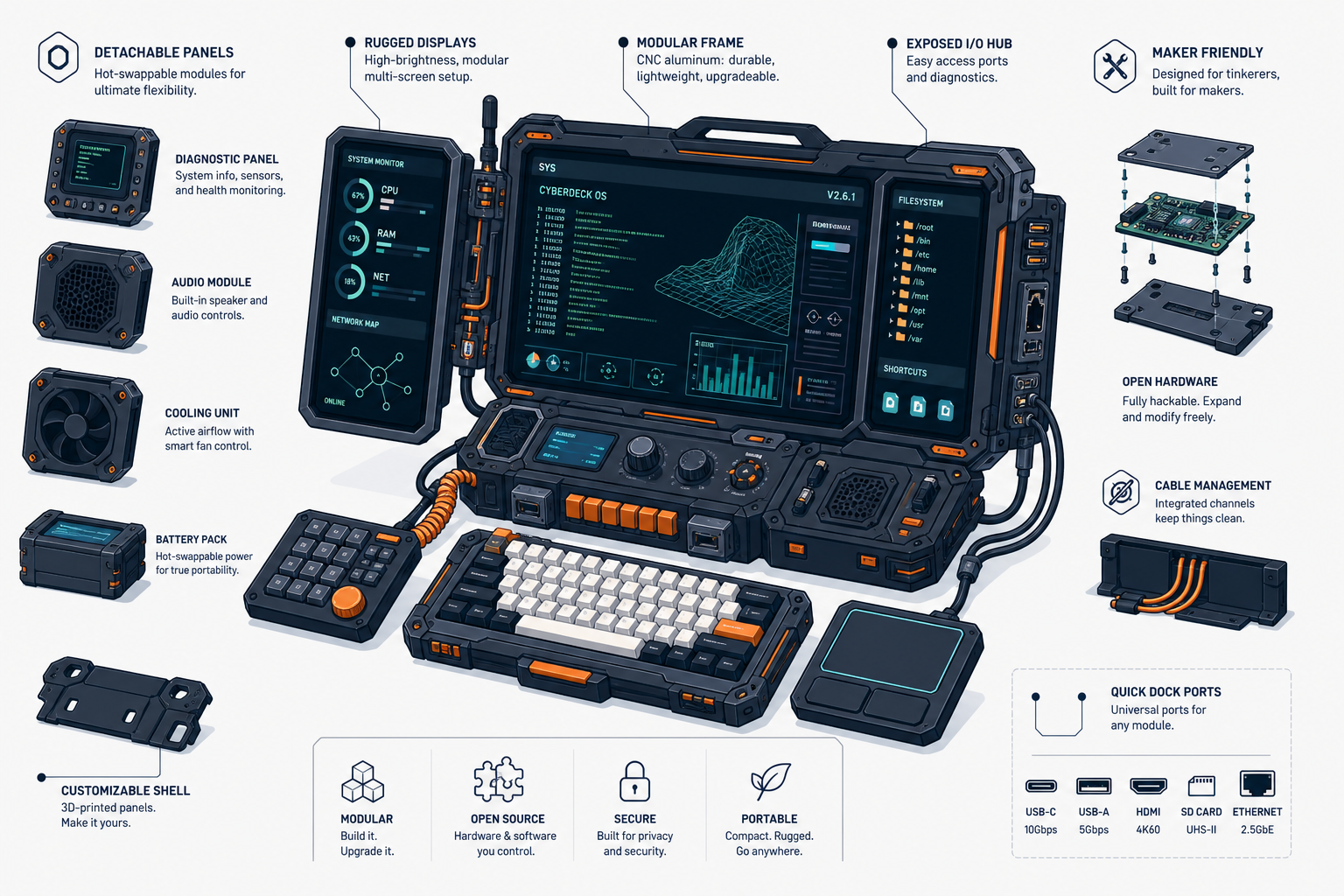
A cyberdeck is a form of custom-built computer designed for specific needs, usually in a portable, compact, and highly customizable format. For many developers, makers, and hardware enthusiasts, a cyberdeck is not just a device, but also a way of thinking: building a computer that truly matches their workflow and intended use.

What Is a Cyberdeck?

The definition of a cyberdeck and the origins of the concept

A cyberdeck is a custom computer generally built from a combination of a single-board computer, a small display, a keyboard, a battery, and other additional modules within a unique enclosure. Its form can resemble a mini laptop, a portable terminal, a tactical briefcase, or an experimental device with a futuristic style.

The term cyberdeck is heavily influenced by cyberpunk aesthetics, especially from 1980s science fiction novels such as the works of William Gibson. In cyberpunk imagination, a cyberdeck is portrayed as a portable, advanced personal computing device used to access digital networks directly. In the real world, this concept has evolved into a DIY project category that combines functionality, mobility, and strong visual character.

Today, a cyberdeck does not always have to look dark or futuristic. The core idea remains the same: a custom-built computer created for a specific purpose, often portable, modular, and highly personal.

The difference between a cyberdeck and a regular custom-built PC

The main difference lies in the design philosophy.

A regular custom-built PC generally focuses on performance, ease of upgrading, and general-purpose use such as gaming, editing, or office work. Its components also tend to follow desktop standards: ATX or micro-ATX motherboards, conventional cases, external monitors, and fixed power sources.

A cyberdeck, on the other hand, focuses more on specific functionality and integration. All components are designed to work together as a single system that can be carried around, used in the field, or optimized for particular scenarios. For example:

  • a portable Linux terminal for server administration
  • a pentesting lab device
  • a mini workstation for mobile coding
  • an IoT node for monitoring
  • an experimental computer for radio, sensors, or automation

So, while a regular custom-built PC aims for all-around performance, a cyberdeck prioritizes functional efficiency, portability, and design identity.

Main Components of a Cyberdeck

Commonly used hardware modules

The components of a cyberdeck depend heavily on its intended purpose, but the following modules are among the most commonly used:

1. Main computing unit
Typically uses:

  • Raspberry Pi
  • Orange Pi
  • LattePanda
  • Intel NUC
  • x86 mini PC
  • ESP32-based boards or microcontrollers for specific functions

If your needs are lightweight, such as terminal access, monitoring, or scripting, a Raspberry Pi is often sufficient. If you need light virtualization, fast compilation, or full desktop software, an x86 platform is more suitable.

2. Display
A cyberdeck almost always uses an integrated display. Options may include:

  • 5–10 inch HDMI LCDs
  • touchscreen displays
  • IPS panels for better viewing angles
  • e-ink for certain low-power needs

The display size will greatly affect the overall dimensions of the device.

3. Keyboard and input
The keyboard is an important element because cyberdecks are often used for typing commands, coding, or system navigation. Common choices include:

  • compact mechanical keyboards
  • mini wireless keyboards
  • custom split keyboards
  • trackballs or small touchpads
  • rotary encoders or additional macro buttons

4. Power source
For portable cyberdecks, the power system must be planned from the beginning. Common options include:

  • lithium-ion or lithium-polymer batteries
  • USB-C PD power banks
  • battery management system (BMS) modules
  • step-up/step-down converters
  • battery capacity indicators

5. Case or enclosure
The body of a cyberdeck can be made from:

  • 3D-printed parts
  • acrylic
  • aluminum
  • a small briefcase
  • modified recycled cases

This is where a cyberdeck’s character is most visible. Many makers intentionally design enclosures that are both functional and iconic.

6. Additional modules
Depending on the need, a cyberdeck can be equipped with:

  • Wi-Fi and Bluetooth
  • GPS
  • SDR (software-defined radio)
  • LoRa
  • external SSD or NVMe
  • cooling fans
  • USB hubs
  • cameras
  • environmental sensors
  • GPIO breakouts

A good cyberdeck is not the one with the most modules, but the one whose components are truly relevant to the intended use.

The role of software and operating systems in a cyberdeck

Hardware is only half the story. A cyberdeck becomes useful because the software installed on it matches its intended purpose.

Commonly used operating systems include:

  • Raspberry Pi OS
  • Ubuntu
  • Debian
  • Arch Linux
  • Kali Linux
  • Windows for certain x86-based cyberdecks

For many projects, Linux is the primary choice because it is lightweight, flexible, and easy to customize. You can build a minimal terminal interface, a lightweight desktop, or a system that boots directly into a specific application.

Examples of software needs on a cyberdeck:

  • terminal and SSH clients for remote servers
  • Docker for development environments
  • network analysis tools
  • code editors such as Neovim or VS Code
  • SDR software
  • monitoring dashboards
  • Python or Bash automation scripts

Example of basic package installation on Debian/Ubuntu:

sudo apt update
sudo apt install neovim tmux htop git curl

If you want your cyberdeck to be ready immediately for remote server access:

sudo apt install openssh-client mosh

Software determines whether a cyberdeck is merely visually appealing or truly productive for everyday use.

Why Cyberdecks Are Becoming a Custom-Built Computer Trend of the Future

The advantages of cyberdecks for developers and makers

Cyberdecks are appealing because they address increasingly specific needs. Not everyone needs a large laptop or a full desktop to work. Many developers and makers instead need a device that is:

  • quick to power on
  • lightweight to carry
  • ready for specific tasks
  • power-efficient
  • easy to modify

For developers, a cyberdeck can serve as a portable coding terminal, a debugging machine, or a tool for server access from anywhere. For makers, a cyberdeck is a project control center: connecting sensors, testing scripts, reading data, or running prototypes directly in the field.

There is also significant educational value. When building a cyberdeck, you learn about:

  • hardware integration
  • power management
  • operating systems
  • enclosure design
  • troubleshooting
  • personal computing workflows

This makes a cyberdeck more than just a custom-built device. It becomes a real learning project.

Flexibility, portability, and extensive customization

One reason cyberdecks are becoming more popular is that there are almost no rigid design limitations. You can build a device that is very simple or highly complex, depending on your budget and needs.

Some examples of design approaches:

  • an ultra-compact cyberdeck for SSH and monitoring
  • a field cyberdeck with a large battery and bright display
  • a desktop-mini cyberdeck with a full mechanical keyboard
  • an experimental cyberdeck with radio, GPS, and sensors
  • a retro-futuristic cyberdeck for personal branding projects

This flexibility is difficult for factory-made devices to match. Commercial products are usually designed for broad markets, while a cyberdeck is built for a single user with highly specific needs.

Portability is also a major advantage. With a smaller size and a self-contained power system, a cyberdeck can be used in workshops, laboratories, vehicles, server rooms, or while traveling. Its high level of customization makes each unit feel unique, both in terms of function and appearance.

A Guide to Getting Started with Building a Cyberdeck

Defining your needs and cyberdeck design

The most common mistake when starting out is buying components immediately without a clear purpose. Before assembling anything, first determine what the cyberdeck will be used for.

Some important questions:

  • Is it for coding, remote server access, monitoring, or hardware experimentation?
  • Does it need to be truly portable?
  • How much battery life is required?
  • Does it need special connectivity such as Ethernet, LoRa, or SDR?
  • Do you prioritize compact size or typing comfort?

From there, you can begin defining the design.

If the main need is a portable Linux terminal, then focus on:

  • a low-power board
  • a small, sharp display
  • a comfortable keyboard
  • sufficient battery capacity
  • a lightweight enclosure

If the requirements are heavier, such as x86 development or local data analysis, use a more powerful platform even if that means increased size and power consumption.

Create a simple sketch before buying components. It does not have to be neat; what matters is that it shows:

  • display position
  • keyboard placement
  • cable routing
  • ventilation
  • I/O ports
  • battery space

This planning will save a great deal of time during assembly.

Tips for choosing components and assembling a cyberdeck

Here are some practical tips to make your cyberdeck project more efficient:

1. Start with a simple system
Do not install too many modules right away. Build the basic version first: board, display, keyboard, and power. Once it is stable, add other features.

2. Choose compatible components that are easy to test
Make sure the display supports the output of the board you are using, the power source is stable enough, and the keyboard can be recognized by the system immediately. Poor compatibility is often the most time-consuming source of problems.

3. Pay attention to power management
This is a part that is often underestimated. Calculate the power needs of all components, especially if using batteries. Make sure there is a safe margin so the system does not shut down unexpectedly.

4. Prepare cooling
Even small boards can get hot if used continuously. Add a heatsink or a small fan if needed, especially for tightly enclosed cyberdecks.

5. Design for service access
Try to ensure that the enclosure still allows you to open certain sections without fully disassembling everything. This is important for replacing batteries, storage, or repairing cables.

6. Use reliable storage
If you are using a Raspberry Pi, consider an SSD instead of relying solely on a microSD card, especially for intensive use. This helps improve both speed and durability.

7. Test each module individually
Before installing everything into the enclosure, test each part one by one:

  • the board boots successfully
  • the display works normally
  • the keyboard functions properly
  • the battery supplies stable power
  • Wi-Fi and other ports work correctly

8. Do not ignore ergonomics
A cyberdeck that looks visually impressive is not necessarily comfortable to use. The display angle, key size, and hand position still matter if the device will be used regularly.

9. Leave room for upgrades
If possible, make space for additional modules or spare cable routes. Cyberdecks often evolve over time.

10. Document the process
Record the wiring, parts list, and software configuration. This makes troubleshooting and future upgrades much easier.

Example of a simple folder structure for storing project documentation:

cyberdeck-project/
├── docs/
├── wiring/
├── configs/
├── scripts/
└── parts-list.txt

Conclusion

A cyberdeck represents an evolution of the custom-built computer into something more personal, purposeful, and functional. It combines the DIY spirit, modern computing needs, and design freedom into a single device that can be fully tailored.

For developers and makers, a cyberdeck offers something that standard devices rarely can: full control over how a computer is built and used. If you want a work device that is more specific, portable, and unique, a cyberdeck is a project well worth trying.

Start with simple needs, choose the right components, and assemble it gradually. The best cyberdeck is not the most complicated one, but the one that fits your work best.

This article was written by artificial intelligence (AI) using the gpt-5.4 model via SumoPod AI.

This article was translated by Artificial Intelligence (AI) using gpt-5.4 via SumoPod AI.

Dosen Teknik Informatika di UBP Karawang sekaligus Programmer Freelance. Menggabungkan riset akademis di bidang AI & Machine Learning dengan pengembangan solusi teknologi nyata untuk industri.

Cari Blog Ini

Diberdayakan oleh Blogger.

Arsip Blog