Halo, saya Hello, I am

Adi Rizky Pratama

Saya seorang I am a

Dosen Teknik Informatika di UBP Karawang sekaligus Programmer Freelance. Menggabungkan riset akademis di bidang AI & Machine Learning dengan pengembangan solusi teknologi nyata untuk industri. Lecturer of Informatics Engineering at UBP Karawang and a Freelance Programmer. Combining academic research in AI & Machine Learning with the development of real-world technology solutions for industry.

6+
Publikasi Publications
50+
Sitasi Citations
10+
Proyek Projects
Dosen & Peneliti Lecturer & Researcher
Full-Stack Dev Full-Stack Dev
AI / ML AI / ML
Geser untuk efek 3D Drag for 3D effect
Adi Rizky Pratama

Akademisi yang Melek Industri Industry-Savvy Academician

Sebagai dosen di Program Studi Teknik Informatika Universitas Buana Perjuangan Karawang, saya mengajar dan meneliti di bidang kecerdasan buatan, pengolahan citra, dan pengembangan aplikasi. Di sisi lain, pengalaman sebagai programmer freelance memungkinkan saya menjembatani teori dan praktik — menghadirkan solusi teknologi yang didasari riset ilmiah yang kuat. As a lecturer in the Informatics Engineering Study Program at Universitas Buana Perjuangan Karawang, I teach and conduct research in artificial intelligence, image processing, and application development. On the other hand, my experience as a freelance programmer allows me to bridge theory and practice — delivering technology solutions built on robust scientific research.

Menjabat sebagai Kepala Pusat Data dan Informasi (PUSDATIN) UBP Karawang, saya terbiasa memimpin proyek digitalisasi skala besar dan berkolaborasi lintas tim. Serving as the Head of the Center for Data and Information (PUSDATIN) at UBP Karawang, I am accustomed to leading large-scale digitalization projects and collaborating across teams.

Dosen Tetap Full-time Lecturer

Teknik Informatika, UBP Karawang Informatics Engineering, UBP Karawang

Riset AI & ML AI & ML Research

CNN, LSTM, k-NN, OCR

Kepala PUSDATIN Head of PUSDATIN

Digitalisasi & Data Center Digitalization & Data Center

Freelance Dev Freelance Dev

Web & Mobile Applications Web & Mobile Applications

Apa yang Bisa Saya Bantu? How Can I Help You?

Menggabungkan keahlian akademis dan pengalaman industri untuk memberikan solusi terbaik. Combining academic expertise and industry experience to deliver the best solutions.

Software Development

Pengembangan aplikasi web & mobile custom sesuai kebutuhan bisnis Anda. Dari landing page hingga sistem enterprise. Custom web & mobile application development tailored to your business needs. From landing pages to enterprise systems.

IT Consulting

Konsultasi arsitektur sistem, pemilihan teknologi, transformasi digital, dan optimasi infrastruktur IT. Consulting on system architecture, technology stack selection, digital transformation, and IT infrastructure optimization.

Corporate Training

Pelatihan pemrograman, data science, dan AI untuk tim korporat maupun institusi pendidikan. Programming, data science, and AI training for corporate teams and educational institutions.

Research Collaboration

Kolaborasi riset di bidang machine learning, computer vision, dan data mining untuk publikasi ilmiah. Research collaboration in machine learning, computer vision, and data mining for scientific publications.

Tech Stack yang Dikuasai Mastered Tech Stack

HTML5
CSS3
JavaScript
Bootstrap
PHP
Laravel
Node.js
Python
TensorFlow
Keras
MySQL
PostgreSQL
Git & GitHub

Tri Dharma Perguruan Tinggi Three Pillars of Higher Education

Pengajaran, penelitian, dan pengabdian masyarakat sebagai fondasi kontribusi ilmiah. Teaching, research, and community service as the foundation of scientific contribution.

Mata Kuliah yang Diampu Courses Taught

Pemrograman Web Web Programming
Kecerdasan Buatan Artificial Intelligence
Machine Learning Machine Learning
Pengolahan Citra Digital Digital Image Processing
Basis Data Database Systems
Pemrograman Mobile Mobile Programming

Pengabdian Masyarakat Community Service

Digitalisasi UMKM melalui implementasi e-learning, QRIS, dan sistem informasi untuk pelaku usaha mikro di Karawang. Digitalization of MSMEs through the implementation of e-learning, QRIS, and information systems for micro-businesses in Karawang.

Highlight Publikasi Riset Research Publication Highlights

1

Penggunaan media pembelajaran Wordwall untuk meningkatkan minat dan motivasi belajar siswa The use of Wordwall learning media to improve students' interest and learning motivation

Zahro, N. A. Q., & Pratama, A. R.

50+ Sitasi 50+ Citations Jurnal Journal
2

Perbandingan Algoritma Apriori Dan FP-Growth Terhadap Market Basket Analysis Comparison of Apriori and FP-Growth Algorithms for Market Basket Analysis

Fathurrahman, M., Pratama, A. R., & Al-Mudzakir, T.

Data Mining Jurnal Journal
3

Implementasi CNN Untuk Klasifikasi Citra Kemasan Kardus Defect dan No Defect CNN Implementation for Defect and No Defect Cardboard Box Image Classification

Antoni, A., Rohana, T., & Pratama, A. R.

Computer Vision CNN

Proyek & Hasil Karya Projects & Creative Works

Koleksi proyek dari dunia akademik, freelance, dan open source. A collection of projects from academic, freelance, and open-source fields.

Memuat proyek... Loading projects...

Pengalaman & Pendidikan Experience & Education

Perjalanan karir di dunia akademik dan industri teknologi. Career journey in the academic world and technology industry.

Akademik Academic 2018 — Sekarang 2018 — Present

Dosen Tetap Full-time Lecturer

Universitas Buana Perjuangan Karawang

Mengajar mata kuliah Pemrograman Web, AI, Machine Learning, dan membimbing riset mahasiswa di Program Studi Teknik Informatika. Teaching Web Programming, AI, Machine Learning, and supervising student research in the Informatics Engineering Study Program.

Freelance Freelance 2019 — Sekarang 2019 — Present

Freelance Web Programmer Freelance Web Programmer

Berbagai Klien & Proyek Various Clients & Projects

Mengembangkan aplikasi web dan mobile untuk klien dari berbagai industri. Spesialisasi di PHP/Laravel, JavaScript, dan Python. Developing web and mobile applications for clients across various industries. Specializing in PHP/Laravel, JavaScript, and Python.

Akademik Academic 2018 — Sekarang 2018 — Present

Kepala PUSDATIN Head of PUSDATIN

UBP Karawang

Memimpin Pusat Data dan Informasi universitas. Mengelola infrastruktur IT, sistem informasi akademik, dan digitalisasi kampus. Leading the university's Center for Data and Information. Managing IT infrastructure, academic information systems, and campus digitalization.

Pengabdian Service 2021 — Sekarang 2021 — Present

Digitalisasi UMKM MSME Digitalization

Karawang & Sekitarnya Karawang & Surrounding Areas

Program pengabdian masyarakat: pelatihan IT, implementasi e-learning dan QRIS untuk pelaku usaha mikro. Community service program: IT training, e-learning implementation, and QRIS integration for micro-businesses.

Pendidikan Education 2015 — 2017

S2 — Magister Teknik Informatika Master of Informatics Engineering

Universitas / Institusi University / Institution

Fokus studi pada kecerdasan buatan, pengolahan citra, dan machine learning. Study focus on artificial intelligence, image processing, and machine learning.

Pendidikan Education 2011 — 2015

S1 — Sarjana Teknik Informatika Bachelor of Informatics Engineering

Universitas / Institusi University / Institution

Fondasi keilmuan di bidang pemrograman, basis data, jaringan komputer, dan rekayasa perangkat lunak. Foundational knowledge in programming, databases, computer networks, and software engineering.

Hubungi Saya Contact Me

Ada proyek, kolaborasi riset, atau pertanyaan? Jangan ragu untuk menghubungi. Have a project, research collaboration, or question? Feel free to reach out.

Mari Berkolaborasi! Let's Collaborate!

Saya selalu terbuka untuk peluang kolaborasi, baik di bidang akademik maupun pengembangan software. Silakan hubungi saya melalui platform berikut. I am always open to collaboration opportunities, both in the academic sphere and software development. Please contact me through the platforms below.
Advertisement

Jumat, 03 Juli 2026

What is bench.sh?

What is bench.sh?

What is bench.sh?

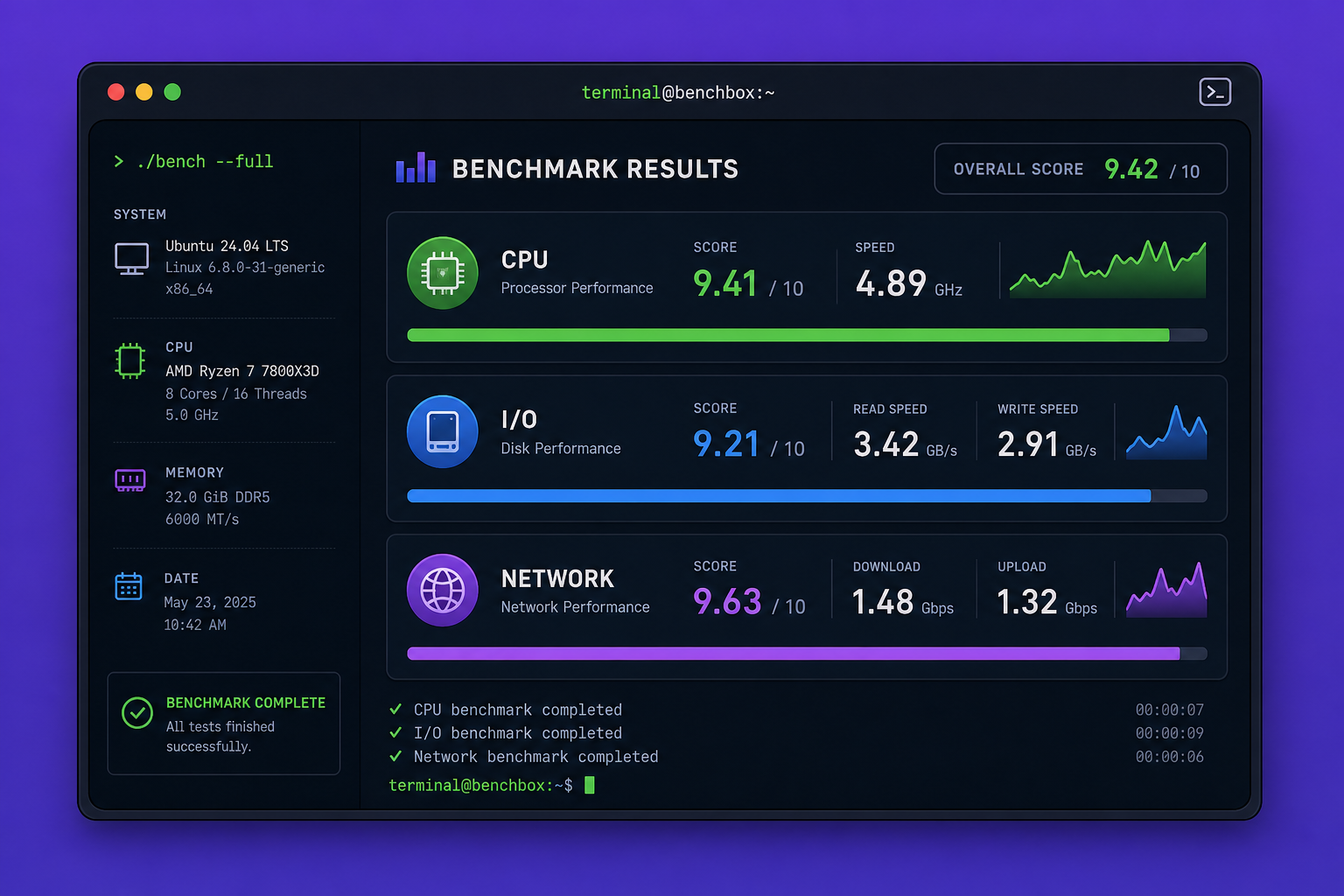
Bench.sh is a lightweight shell script designed to quickly benchmark the performance of a VPS or dedicated server. With just a single command, you can get an initial overview of the server's CPU capabilities, disk read/write speed (I/O), and network connection (download/upload) speed.

Definition and Function

Bench.sh collects data by running a series of simple tests: calculating prime numbers for CPU, writing and reading temporary files for I/O, and fetching files from several servers in various locations for network speed. The results are displayed directly in the terminal in an easy-to-read table format.

Its main purpose is for quick diagnostics before or after purchasing a VPS, comparing hosting providers, or ensuring the server is not in poor condition due to noisy neighbor issues.

Advantages of Using bench.sh

  • Simple and portable: Only needs an internet connection and a standard shell. No additional package installation required.
  • Fast: The entire process usually completes in 1–3 minutes.
  • Free and open source: The code can be inspected for security.
  • Support for multiple network test locations: Displays speed to servers in the US, Europe, Asia, etc.
  • Easy to share: Results can be directly copied and pasted to forums or chats.

How to Download and Run bench.sh

The process is very simple. You just need to access the server terminal (SSH) and run a curl or wget command pointing to the official script.

Basic Terminal Command

Run the following command:

curl -sL yabs.sh | bash

Or if you prefer wget:

wget -qO- yabs.sh | bash

The script will automatically download and execute the benchmark. Wait until all tests are complete — the results will appear on screen.

Useful Additional Options

Bench.sh (or variants like yabs.sh) supports several parameters:

  • --skip-io : Skips the disk I/O test (useful if you only want to check CPU and network).
  • --skip-network : Skips the network test.
  • --skip-cpu : Skips the CPU test.
  • --location : Specifies the location of the network server to test (example: --location US).

Example usage:

curl -sL yabs.sh | bash -s -- --skip-io

With these options, you can shorten the time or focus on specific aspects.


Understanding the CPU, I/O, and Network Benchmark Results

Once the script finishes, you will see three main sections: CPU, Disk I/O, and Network Speed. Each has numbers that you need to know how to read.

Interpreting CPU and I/O Scores

The CPU test uses a method of calculating prime numbers in GCD (or a similar algorithm). The score is usually displayed in events per second (or similar). The higher the number, the faster the processor.

  • For entry-level VPS (1 core ~2.0 GHz), CPU scores typically range between 500–2000 events/s.
  • Mid-range VPS (2–4 modern cores) can reach 4000–8000 events/s.
  • High-end dedicated servers can be above 15,000 events/s.

The Disk I/O test writes and reads files of a certain size (usually 4K and 1M) and displays speed in MB/s. Pay attention to two values:

  • 4K block: measures random access speed. VPS with SSD should be > 20 MB/s. HDD is usually < 5 MB/s.
  • 1M block: measures sequential speed. SSD can reach > 500 MB/s, HDD in the range of 100–200 MB/s.

If the I/O is very low, the provider may be using shared storage that is overloaded or using old HDDs.

Network Speed Analysis (Download/Upload)

The network section displays a list of servers from various countries (e.g., Amsterdam, Singapore, New York) with download and upload speeds in Mbps.

  • Watch for consistency: If one location is very slow, that may be normal due to geographical distance or poor peering. But if all locations are slow (below 100 Mbps for a VPS with 1 Gbps bandwidth), there is a problem.
  • Upload is usually lower than download due to upstream provider limitations. Compare with the promised specifications (e.g., dedicated 1 Gbps). If the result is only 300 Mbps under idle load, suspect throttling.

Tips and Recommendations for Benchmark Results

Raw numbers mean nothing without context. Here's how to use them properly.

Comparing with Other VPS

You can compare results with public databases (e.g., on LowEndTalk forums, VPSBenchmarks, or sites like HostScore). Pay attention to:

  • Identical specifications: Compare with VPS that have the same number of cores, RAM, and storage type.
  • Testing time: Run benchmarks during peak and off-peak hours to see fluctuations.
  • Location: Servers in Europe usually yield different results than servers in Asia due to different network routes.

Use the CPU and I/O scores to assess whether the VPS is worth the price paid.

When to Rerun the Benchmark

Don't rely on a single test. Repeat the benchmark in the following situations:

  • After a server restart or maintenance to ensure no changes.
  • When the server feels slow — compare the new results with previous ones.
  • After migration or upgrade to measure improvement.
  • After a few months — performance can degrade over time due to node saturation or hardware degradation.

Run at least twice at different times (e.g., at night and during the day) to assess stability.


Bench.sh is not a tool for in-depth analysis, but it is reliable enough as a quick health check. Use its results as an initial indicator before concluding server issues — and always compare with the context of your specifications.

This article was written by artificial intelligence (AI) using the dahono/deepseek-v4-flash model via Dahono Labs.

This article was translated by Artificial Intelligence (AI) using dahono/deepseek-v4-flash via Dahono Labs.

Tidak ada komentar:

Posting Komentar

Dosen Teknik Informatika di UBP Karawang sekaligus Programmer Freelance. Menggabungkan riset akademis di bidang AI & Machine Learning dengan pengembangan solusi teknologi nyata untuk industri.

Cari Blog Ini

Diberdayakan oleh Blogger.

Arsip Blog